
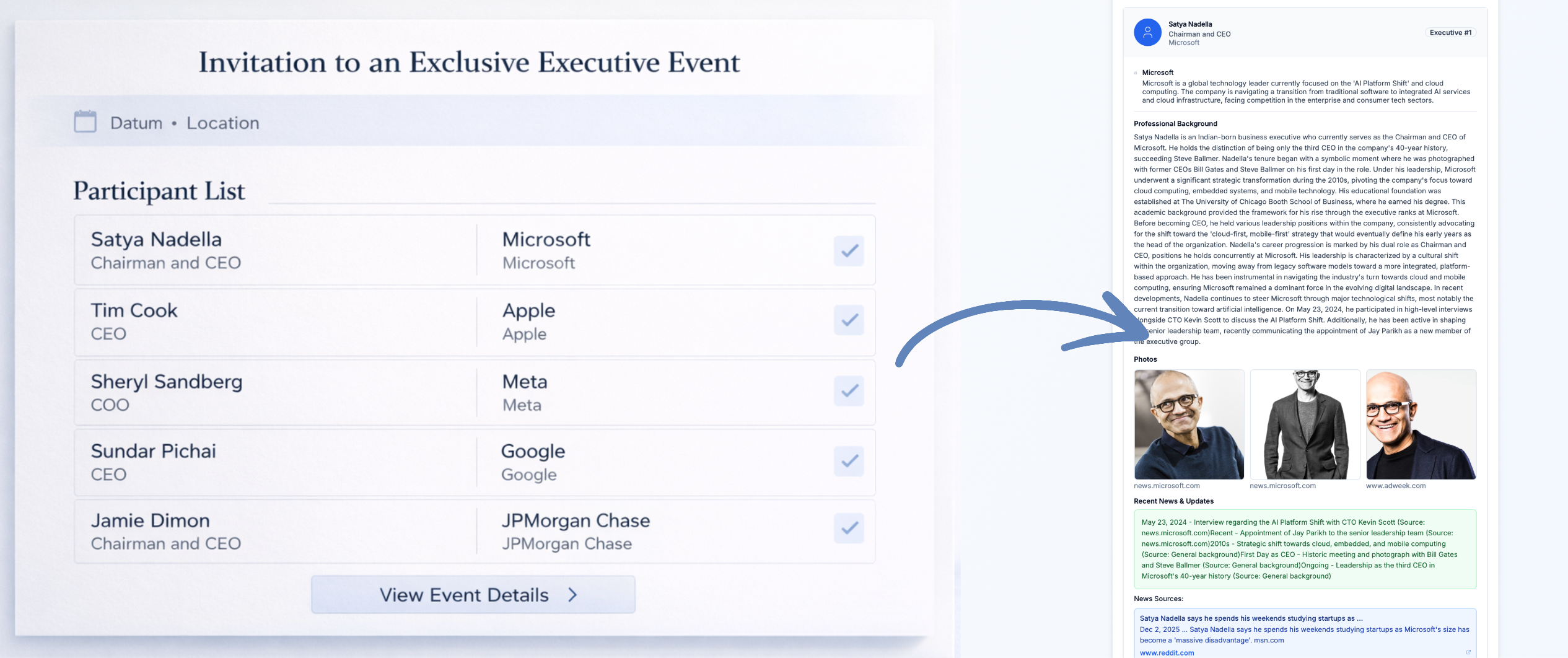
It started with a simple question from my CEO:
“Can you create briefings for the 12 executives I’m meeting tomorrow? ChatGPT gives me inconsistent results and doesn’t show photos.”
I thought: “Sure, how hard can it be?”
Spoiler: Harder than expected.
The Real Problem
Everyone who regularly attends executive events, board meetings, or C-level roundtables knows this scenario:
6:00 PM: Email with participant list for tomorrow’s event
6:05 PM: You open the list. 15 names. You know 2.
6:10 PM: LinkedIn research begins
9:00 PM: You’ve gone through 8 profiles. No idea who person 1 was anymore.
At the event: You read name tags. Try to remember. “Wait, was that the CTO or the CFO?”
The problem isn’t the information. It exists. Publicly. On LinkedIn, company websites, in news articles.
The problem is:
- Time – 3 hours of research for 15 people
- Format – Information scattered across 10 sources
- Recognition – Reading bios ≠ recognizing people
And that’s exactly what my CEO wanted solved.
Why Existing Solutions Don’t Work
Attempt 1: ChatGPT
“Brief me on these 12 executives”
What happens:
- Hallucinates company names (“John Smith is CTO at TechCorp” – company doesn’t exist)
- Outdated information (training data cutoff)
- No images (can’t fetch and display external images)
- Inconsistent format (each person structured differently)
Verdict: Unusable for professional executive briefings.
Attempt 2: Perplexity
Better. Live search. Current info.
But:
- Must search each person individually (15 people = 15 queries)
- No structured output
- No images in usable format
- No export function
Verdict: Better than ChatGPT, but too manual.
Attempt 3: LinkedIn
The obvious solution.
But:
- Opening 15 profiles = 15 tabs
- Copy & compile information
- No news/updates outside LinkedIn
- 3 hours of work
Verdict: Works. But not in 60 minutes before the event.
The Solution: PreBriefed
“Okay, if there’s no solution, I’ll build it.”
3 weekends later: prebriefed.com
The Concept:
One input: Names + companies of meeting participants
One output: Structured briefing with:
- Photo (recognize them in the room)
- Background (role, company, career)
- Recent News (announcements, moves, achievements)
- Talking Points (conversation topics based on current developments)
In 60 seconds.

What Happens Under the Hood
(Without getting too technical)
Input: “John Smith, CTO, Acme Corp”
Step 1: Enrichment
- Multi-source web search (news, company sites, professional networks)
- Image search with validation (is this really John Smith from Acme?)
- Deduplication & fact-checking (multiple sources confirm)
Step 2: Structuring
- LLM extracts relevant information
- Categorizes into: Background, Recent News, Company Info
- Generates talking points based on recent news
Step 3: Formatting
- Structured briefing format
- Images optimized for print & mobile
- Export as PDF or plain text
What was harder than expected:
- Image Validation – “Is this photo really of John Smith, CTO at Acme?”
- Fact-Checking – LLMs hallucinate. Multi-source validation is critical.
- Talking Points – Generic “Tell me about your company” is boring. “I saw you just raised Series B” is better.
The Features That Make the Difference
1. Photos (the most important feature)
The Problem:
You read 12 bios. Go to the event. Recognize nobody.
The Solution:
Each person has a photo. You recognize them in the room.
Why this is hard:
“John Smith” in Google Images = 1 million results.
Which is the right John Smith, CTO at Acme Corp?
Validation via company website, LinkedIn, news articles.
2. Recent News (not just bio)
Bios are static. “John has been CTO at Acme since 2020.”
More interesting:
“Acme announced Series B (€50M) last week. John was quoted in TechCrunch.”
That’s a conversation starter.
3. Talking Points (AI-generated)
Generic icebreaker: “Tell me about your company.”
AI-generated based on news:
“Congrats on the Series B! How are you planning to deploy the €50M?”
The second one starts better conversations.
4. Confidential by Design
The Concern:
“Can I upload my board meeting guest list to an AI tool?”
The Solution:
- Guest lists are never stored
- Only public information used
- No data used for training
Critical for risk-averse executives.
5. EN/DE Support
Many German executives have international meetings.
PreBriefed works in both German and English.
Input in German? Output in German.
Input in English? Output in English.
How I Built It
Tech Stack:
- Frontend: Next.js 14 (App Router)
- Backend: Next.js API Routes
- AI: Multiple LLM providers (fallbacks for reliability)
- Search: Custom web search pipeline
- Images: Multi-source image search + validation
- Auth: NextAuth (for Pro features)
- Payment: Stripe
- Hosting: Vercel
Timeline:
- Weekend 1: MVP – names in, bios out (no styling)
- Weekend 2: Added image search + validation
- Weekend 3: Talking points, PDF export, polish
- Weekend 4: Auth, payments, landing page
Total time: ~80 hours over 4 weekends
What I Learned
1. “Simple” problems are often hard
“Find John Smith’s photo” sounds trivial.
It’s not trivial when:
- 10,000 John Smiths exist
- You must verify the right one
- The image must look professional
- It must happen in 60 seconds
2. LLMs hallucinate. Always.
My first tests: 30% of companies were invented.
Solution:
Multi-source validation. If 3 sources say “John is CTO at Acme,” it’s probably true.
If only one source says it? Flag as “unverified.”
3. User Experience > Features
Version 1:
15 input fields. “Name”, “Company”, “Role”, “LinkedIn”, “Twitter”…
Feedback: “Too complicated. I only have a guest list.”
Version 2:
One text field. Paste the guest list. Done.
Fewer features. Better UX.
4. First paying customer comes faster than expected
Day 1 after launch: 3 free users (friends)
Day 3: 12 free users (LinkedIn post)
Day 7: First Pro subscriber (€9.99/month)
I thought it would take weeks. It took one week.
The problem is real. The solution is needed.
What’s Next
Feedback from early users:
- “Can I upload my calendar invite?”→ Coming: Automatic name extraction from .ics files
- “Can I save briefings for later?”→ Coming: Briefing history (Pro feature)
- “Can I add custom notes?”→ Coming: Editable briefings with your own notes
- “Does this work for Zoom meetings?”→ Maybe: Browser extension that auto-briefs Zoom participants
Why MicroSaaS?
I lead AI strategy for a €13B company. I work on complex enterprise AI problems.
But:
PreBriefed taught me more about product-market fit in 4 weekends than 3 years of enterprise AI.
Why?
- Direct feedback – Users pay or they don’t. Immediately.
- Real problem – Not “Could we theoretically…”, but “I need this now.”
- Fast iteration – Weekend 1: Build. Weekend 2: Ship. Weekend 3: Iterate.
Enterprise AI is strategically important. But the feedback loop is 18 months.
MicroSaaS? The feedback loop is 18 minutes.
The Honest Retrospective
What went well:
✅ Problem was real (CEO had it, others did too)
✅ MVP in 4 weekends (not 4 months)
✅ First paying customer after 7 days
✅ Technology works reliably
What was difficult:
❌ Image validation is hard (30% error rate initially)
❌ LLM hallucination prevention needs multi-source checks
❌ Finding the right pricing (€9.99? €19.99? €29.99?)
❌ Marketing (I’m an engineer, not a marketer)
What I’d do differently:
→ Launch earlier – Version 1 was “not good enough.” Version 2 was “okay.” Should have launched with version 1.
→ More user feedback before building – I built features nobody needs.
→ Simpler pricing – Free + Pro is enough. Don’t need 4 tiers.
Want to Try It?
Free Tier:
- Up to 3 participants per briefing
- Full profiles with photos
- No account needed
Pro (€9.99/month):
- Unlimited participants
- Unlimited briefings
- PDF export
- Briefing history
Perfect if you:
- Regularly attend executive events
- Have board meetings with new participants
- Attend C-level roundtables
- Never want to be unprepared again
The Bottom Line
PreBriefed isn’t the next unicorn.
It solves a specific problem for a specific audience.
And that’s what makes MicroSaaS beautiful:
No VC pitches. No 10-year vision. No “We’re revolutionizing the industry.”
Just:
“Here’s a problem. Here’s the solution. Here’s €9.99/month.”
Sometimes that’s enough.
Links:
- PreBriefed: prebriefed.com